Pub/Sub communication
Use of Neos communication API
graph TD
    CTA --> |"1 - publish event"|DAPR_A("Sidecar DAPR A")
    DAPR_A:::dapr --> |"2 - write message"|MQ("message broker component (ex: RabbitMQ)")
    MQ --> DAPR_B("Sidecar DAPR B")
    MQ --> DAPR_C("Sidecar DAPR C")
    DAPR_B:::dapr --> CTB
    DAPR_C:::dapr --> CTC

    subgraph Cluster B
        CTB["subscription"]
    end

    subgraph Cluster C
        CTC["subscription"]
    end

    subgraph Cluster A
        CTA["Business code"]
    end

    classDef tm fill:#30EDFF;
    classDef dapr fill:#0067C0,color:#fff
    classDef api fill:#347804,color:#fff
The message broker component is a component supported by DAPR supported components. In the examples we will use RabbitMQ.
Configuration
It is first necessary to set up the DAPR communication.
If you use docker-compose then create a components folder and in this folder create the neos-pubsub.yaml file with the following contents.
apiVersion: dapr.io/v1alpha1
kind: Component
metadata:
  name: neos-pubsub
  namespace: my-namespace
spec:
  type: pubsub.rabbitmq
  version: v1
  metadata:
  - name: host
    value: "amqp://neos-dapr-rabbitmq:5672"
  - name: durable
    value: "false"
  - name: deletedWhenUnused
    value: "false"
  - name: autoAck
    value: "false"
  - name: reconnectWait
    value: "0"
  - name: concurrency
    value: parallel
The service in the docker-compose.yml to start the DAPR side-car :
mycluster-backend-dapr:
    image: "daprio/daprd:1.8.4"
    container_name: mycluster-backend-dapr
    command: [
      "./daprd",
     "--app-id", "mycluster",
     "--app-port", "7000",
     "--log-level", "debug",
     "--resources-path", "./components",
     "--config", "./configuration/neos-config.yaml"
     ]
    volumes:
      - "./components/:/components"
      - "./configuration/:/configuration"
      - "../docker/backend/MyCluster.AspNetCore:/app"
    network_mode: "service:mycluster-backend"
    depends_on:
      - mycluster-backend
If you use Kubernetes the following yaml file must be apply with the command kubectl apply -f neos-pubsub.yaml.
apiVersion: dapr.io/v1alpha1
kind: Component
metadata:
  name: neos-pubsub
  namespace: my-namespace
spec:
  type: pubsub.rabbitmq
  version: v1
  metadata:
  - name: host
    value: "amqp://neos-dapr-rabbitmq:5672"
  - name: durable
    value: "false"
  - name: deletedWhenUnused
    value: "false"
  - name: autoAck
    value: "false"
  - name: reconnectWait
    value: "0"
  - name: concurrency
    value: parallel
It is possible to modify the spec part to use another component than rabbitmq or to modify the rabbitmq settings. See DAPR RabbitMQ for more information.
Warning
The name neos-pubsub and the namespace neos must not be changed.
Use of Neos Pub/Sub
Publish
The GroupeIsa.Neos.ClusterCommunication.IEventPublication service provides the method PublishEventAsync to publish a message.
The code below publish an event named InterClusterMessage. The event data is a simple string that represents a message to be displayed.
public async Task ExecuteAsync(string message, CancellationToken cancellationToken)
{
    await _eventPublication.PublishEventAsync("InterClusterMessage", message, cancellationToken);
}
Note
The message can be any serializable object, not just a string.
Time to live
By default, every published event is cleared if no subscriber handles it before 72h.
The time to live duration can be configured by passing a PubSubOptions instance to the PublishEventAsync method.
In the example bellow, the event InterClusterMessage has a custom time to live of 30s.
If the event is not handled successfully by a subscriber before it expires, it will be removed from the events queue.
public async Task ExecuteAsync(string message, CancellationToken cancellationToken)
{
    PubSubOptions options = new() { TimeToLiveInSeconds = 30 };
    await _eventPublication.PublishEventAsync("InterClusterMessage", message, options, cancellationToken);
}
Publish message without envelop
By default, the message is published with an envelop that contains the current tenant, current user, current SignalR connection and the application context.
The subscriber action is executed in the context of the publisher, with the same tenant, user and SignalR connection and the application context.
Besides, if the message is published in a mono-tenant cluster, the subscriber action will be executed for all tenants.
To avoid this behavior, you can use the PublishEventAsync method with the PubSubOptions parameter and set the WrapData property to false.
public async Task ExecuteAsync(string message, CancellationToken cancellationToken)
{
    PubSubOptions options = new() { WrapData = false };
    await _eventPublication.PublishEventAsync("InterClusterMessage", message, options, cancellationToken);
}
In this case, the subscriber action will be executed without context (tenant, user, SignalR connection and application context) and only one time.
Subscribe
To subscribe to a published message, a server method must be created in the target cluster.
Click on "Advanced options" button in the toolbar.
Then select the "Subscription" tab.
Turn the "Subscribe to en event" switch on.
Enter the name of the event in "Subscribed event name".
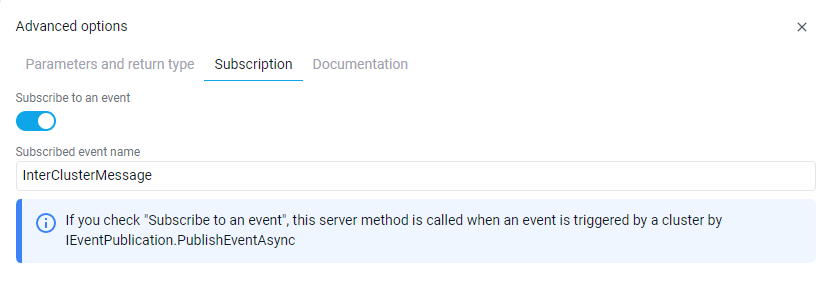
This server method will be executed for all subscribed clusters when the InterClusterMessage is published.
Below is the code for the server method that will be executed when the InterClusterMessage event is received.
/// <summary>
/// Represents MessageReception method.
/// </summary>
public class MessageReception : IMessageReception
{
    /// <summary>
    /// Initializes a new instance of the <see cref="MessageReception"/> class.
    /// </summary>
    public MessageReception()
    {
    }

    /// <inheritdoc/>
    public async Task ExecuteAsync(string message)
    {
        // Do something with the message
    }
}
Multiple subscriptions to the same event
Multiple server methods can subscribe to the same Pub/Sub event within a cluster or across different clusters.
When multiple server methods in the same cluster subscribe to the same event, they are executed sequentially in a specific order:
- First, by module hierarchy (as defined by module dependencies)
- Then, by server method name (alphabetically)
This execution order ensures predictable behavior when multiple handlers need to process the same event.
Important
When multiple server methods subscribe to the same event, they must have consistent properties:
- All must have the same value for Publish message without envelop (
PubSubRawPayload) - Only one of them can define the Dead letter event name (
PubSubDeadLetterEventName), which then applies to the whole subscription
If inconsistent properties are detected, a generation error will occur.
Example
Consider three server methods subscribing to the OrderCreated event:
- Module A (root module):
ValidateOrder(server method)
- Module B (depends on Module A):
SendNotification(server method)UpdateInventory(server method)
Execution order when OrderCreated is published:
Module A: ValidateOrder(executed first because Module A is at the root)Module B: SendNotification(executed second, alphabetically before UpdateInventory)Module B: UpdateInventory(executed last)
Note
If one server method fails, the retry policy applies to the entire subscription, and all server methods will be executed again in the same order.
Retries and dead letter event
There are times when applications might not be able to handle messages for a variety of reasons. For example, there could be transient issues retrieving data needed to process a message or the app business logic fails returning an error. Dead letter topics are used to forward messages that cannot be delivered to a subscribing app. This eases the pressure on app by freeing them from dealing with these failed messages, allowing developers to write code that reads from the dead letter topic and either fixes the message and resends this, or abandons it completely.
Dead letter topics are typically used in along with a retry resiliency policy and a dead letter subscription that handles the required logic for dealing with the messages forwarded from the dead letter topic.
When a dead letter topic is set, any message that failed to be delivered to an app for a configured topic is put on the dead letter topic to be forwarded to a subscription that handles these messages. This could be the same app or a completely different one. (source)
In Neos, each subscription can define its own dead letter event.
In the "Subscription" tab of the server method, enter the name of the event in "Dead letter event name" (PubSubDeadLetterEventName property).
PubSubDeadLetterEventName: OrderCreatedDeadLetter
PubSubEventName: OrderCreated
When a message of the OrderCreated event still fails after all retries, it is published as an OrderCreatedDeadLetter event.
You can then subscribe to this event with another server method, in the same cluster or in any other cluster, to handle the failed messages of this subscription only: send a notification, log the error, update a business status, raise an alert, retry the processing or compensate it.
If no dead letter event is defined, the message is lost once all retries have failed.
Note
The dead letter event name must be different from the subscribed event name, otherwise a failing message would be republished to the same subscription endlessly.
In this case, the generation error M0100 is raised and no dead letter event is configured on the subscription.
Tip
Give each dead letter event a name that identifies its subscription, such as {EventName}DeadLetter, so that failed messages can be monitored and handled separately.
Before the message is published as the dead letter event, a Dapr retry resiliency policy is applied.
By default, the global retry policy on a Neos environment is the following :
policies:
  retries:
    # Neos pubsub retry policy (5 retries with 10s delay between each retry)
    neosPubsubRetries:
      policy: constant
      duration: 10s
      maxRetries: 5
targets: # https://docs.dapr.io/developing-applications/building-blocks/pubsub/pubsub-deadletter/#retries-and-dead-letter-topics
  components:
    neos-pubsub:
      inbound:
        retry: neosPubsubRetries
      outbound:
        retry: neosPubsubRetries
Note
To customize global resiliency policy in your environment, please see this article for development or this article for production.
Note
In addition, you can also customize resiliency policies by cluster. Please see this article for development or this article for production.
Warning
If the subscription to a dead letter event does not define its own dead letter event and a message fails to be delivered, the message will be deleted.
Replay a dead letter message
The subscription to the dead letter event runs in the context of the original message: same tenant, user, SignalR connection and application context. A message published again from this subscription is therefore published in the same conditions as the original one.
To replay the message later, for example from a view once an unavailable service is back or once the message content is fixed, store the context of the original message along with the message. Publishing an EnvelopeHttpMessage keeps its context, whereas any other payload is wrapped with the context of the user who replays it.
// In the subscription to the dead letter event
EnvelopeHttpMessage originalContext = _httpContextAccessor.CreateEnvelope(_applicationContext, _neosTenantInfoAccessor, null);
deadLetter.OriginalContext = JsonSerializer.Serialize(originalContext, JsonSerializerConfiguration.Neos);

// When replaying the message, with its payload possibly fixed
EnvelopeHttpMessage originalContext = JsonSerializer.Deserialize<EnvelopeHttpMessage>(deadLetter.OriginalContext, JsonSerializerConfiguration.Neos)!;
EnvelopeHttpMessage envelope = new(
    originalContext.CorrelationId,
    originalContext.TenantIdentifier,
    originalContext.NeosUser,
    originalContext.ConnectionId,
    originalContext.ApplicationContext,
    deadLetter.Payload);
await _eventPublication.PublishEventAsync("OrderCreated", envelope, cancellationToken);
Warning
The replayed message is handled with the identity and the permissions of the original user. Restrict the replay to administrators.
Note
Dead letter events, and publishing an envelope as is, require Dapr. The local communication used without Dapr has no retry nor dead letter event, and wraps every payload, envelopes included, with the context of the current user.
Dead letter events of Neos subscriptions
The subscriptions of the Neos services and clusters (tenant initialization, database migration, background server methods, reporting, exports, Tenant Management, Task Scheduler...) do not define any dead letter event.
Note
Neos no longer publishes failed messages as the former DefaultDeadLetter event.
Under the hood
GroupeIsa.Neos.ClusterCommunication.IEventPublication use the building DAPR Pub/Sub
Note
If the default resiliency policies doesn't fit your needs, you can override them in the cluster configuration file, see this article for global policies and this article for cluster specific policies.