Key insights
Welcome to the 3.2 release of Neos. There are many updates in this version that we hope you'll like, some of the key highlights include:
- Neos Copilot
- Upgraded to C# 14
- Removed Newtonsoft.Json usage to only use System.Text.Json
- Web API
- Persistence
- User interface
- Deployment
- Metadata
- Tenant Management
- Reporting
- Upgrade troubleshooting
- What's new for DevOps
Neos Copilot
Neos Copilot, the AI coding assistant that helps you build Neos clusters from Claude Code or GitHub Copilot, has changed a fair amount since its 3.0/3.1 alpha. It's now organized into 8 focused skills — cluster bootstrap, metadata authoring, generation, theming, and more — instead of one monolithic prompt, its framework knowledge has been extended, and safety hooks now catch an invalid YAML file the moment it's saved and block writes into generated code outright. It's also available for Claude Code as well as GitHub Copilot.
See Neos Copilot for what it is and how to get it running on an existing cluster.
Upgraded to C# 14
Now, the generated projects and business assemblies uses C# 14. This lets you use new language features, such as the field keyword.
The UI code transpiler also now targets C# 14 (previously C# 12). No new C# 13 or 14 language features are supported by the transpiler itself. The new native method signatures introduced by these versions may also cause transpilation issues.
See Upgrade troubleshooting for known migration issues.
Removed Newtonsoft.Json usage to only use System.Text.Json
Newtonsoft.Json and System.Text.Json are two JSON serialization/deserialization libraries. The framework used to rely on both: mainly Newtonsoft.Json, but also System.Text.Json in a few places.
System.Text.Json has since matured into a more performant library and become the most widely used one, so we removed Newtonsoft.Json to rely exclusively on System.Text.Json.
This also removes a source of compatibility issues: several dependencies (including Dapr) use System.Text.Json internally, and having Newtonsoft.Json alongside it in the same process could lead to conflicts.
You can still use Newtonsoft.Json in your business assemblies for manual JSON serialization/deserialization. However, we recommend migrating to System.Text.Json so that only a single library is used, for performance, consistency, and maintainability reasons.
Even though we made sure JSON serialization and deserialization behave as before, we may have missed some edge cases. Please report any such issue as soon as possible.
Framework-related breaking changes
- Framework projects no longer depend on
Newtonsoft.Json. If the code of your business assemblies referencesNewtonsoft.Json, a metadata migration automatically adds theNewtonsoft.Jsonpackage reference to the corresponding business assembly.csprojfile. However, in some specific cases, the migration may not be able to do so. If this happens, add theNewtonsoft.Jsonpackage reference manually to the business assembly C# project. - The
Newtonsoft.Jsonconverter forLocalizableStringhas been removed.Newtonsoft.Jsonserialization or deserialization of objects containingLocalizableStringproperties in your business assemblies no longer works automatically. You can copy the former converter into your business assembly and pass it explicitly when serializing or deserializing. See Maintain compatibility with existing Newtonsoft.Json code. - A server method expecting an
objectparameter is now of typeSystem.Text.Json.JsonElementinstead ofNewtonsoft.Json.Linq.JObject.
System.Text.Json breaking changes
While migrating, we noticed a few behavioral differences between Newtonsoft.Json and System.Text.Json that are worth being aware of:
- The
requiredkeyword is honored.System.Text.Jsonenforces C#requiredproperties and throws if they are missing from the JSON payload, whileNewtonsoft.Jsonhas no built-in support for this keyword. - A
setorinitaccessor is required for deserialization.System.Text.Jsonneeds a settable property to deserialize into it, whereasNewtonsoft.Jsoncan populate a read-only property. - Deserializing into
objectdoes not infer the runtime type.Newtonsoft.Jsoninfers concrete .NET types (string,long,bool, …) when deserializing into anobject, whileSystem.Text.Jsonalways deserializes into aJsonElement. As a consequence, deserializing into aDictionary<string, object>yields aDictionary<string, JsonElement>instead of a dictionary with native .NET types as values. - Deserialization is stricter regarding type conversions.
System.Text.Jsondoes not allow deserializing a number into astringproperty (and vice versa), whileNewtonsoft.Jsonperforms this conversion implicitly.
Regarding this last point, we ran into it when a cluster published a pub/sub message with a payload object containing an int property, while another cluster subscribing to that pub/sub declared the same property as a string in its matching payload object. Deserialization of the payload failed because the value was a number while the corresponding property was of type string.
If you run into such issues, which only surface at runtime, we added a LooseJsonDeserialization option (to set as an environment variable or in the appsettings file) that enables a more lenient deserialization to quickly unblock this kind of issue. This option allows:
- deserializing a
stringvalue into a number (int,decimal, ...) orboolproperty - deserializing a
numberorboolvalue into astringproperty
Even if the option can help, we recommend fixing the underlying issue instead so that the option can stay disabled and deserialization performance is not degraded.
Web API
Evolving API routes without breaking consumers
Neos 3.2 lets you evolve the REST surface of entity views and server methods without breaking already-integrated clients. Instead of editing a route (a breaking change), you add a new route alongside the old one and deprecate the old one, so consumers migrate at their own pace. Each additional route can also be refined independently — restricted to local callers (Internal use only), hidden from the API explorer (Display in API explorer), or marked obsolete (the generator emits [System.Obsolete(...)], reported as deprecated in OpenAPI / Swagger).
Entity view routes
An entity view operation type (GetAll, Get, Put, …) can now expose several API routes at once, added in bulk from the Web API panel. The route at the controller path stays the technical route used by the application's own screens; the additional routes are the ones you version and deprecate (for example addons/v2 next to addons). Per-route options apply only to additional routes, and marking the entity view itself obsolete propagates to every route.
See Web API and routes, Per-route API-surface options and Deprecating a route.
Server method routes
A server method is no longer limited to a single route: you can add complementary routes that invoke the same business code, each with its own path, verb, options and deprecation. They are purely additive — the primary route keeps working — and a Set as primary route action swaps a complementary route with the primary one for a progressive migration. Conflicting routes are detected at generation time, and marking the server method itself obsolete deprecates all of its routes.
See Complementary routes.
Property omission in POST and PUT requests
Neos now gives callers more flexibility when constructing API payloads by relaxing the rules around which properties must be explicitly included.
Required properties with a default value can be omitted from POST
Required properties that carry a default value no longer need to be included in the request body.
If the property is omitted, the server applies its declared default value automatically.
To force a property to remain explicitly required in POST requests, check the Required in POST option in the Web API tab on the entity view property in Neos Studio.
Omitted properties in PUT retain their current value
Any property that is absent from the PUT body is now left unchanged.
Previously:
- A required property had to be present.
- Omitting non-required property would reset it to its default value.
This change makes partial updates safer and more predictable.
Server method authorization check in client code
Client code can now check ServerMethods.{ServerMethodName}.IsAllowed() before calling a server method. It checks whether the current user is authorized to execute the corresponding server method, and avoids triggering an API call that would otherwise fail with a 403 Forbidden response.
For more details, see Calling the server method from the client.
Persistence
Reading an entity's original value from a rule on an abstract entity
Saving rules and validation rules declared on an abstract base entity can now read an entity's original (pre-modification) value. This was previously impossible: a rule typed on the base entity could not obtain a repository — only concrete IRepository<ConcreteEntity> are registered — and the repository was the only way to call GetOriginal.
Saving-rule arguments now expose args.GetOriginal(item) (typed) and args.GetRepository(item), and validation rules expose the protected GetOriginal() and Repository helpers. The correct concrete repository is resolved per item at runtime, so a single rule on the base entity works across every derived entity — a natural fit for cross-cutting concerns such as a shared IsLocked guard. (Original-value access is not available in Saved rules, where the original values have already been persisted.)
For more details, see Event rules and Validation rules.
Filtered indexes
Neos 3.2 lets an index target only a subset of rows with a WHERE filter — a partial index on PostgreSQL and a filtered index on SQL Server — to keep indexes smaller and query plans sharper on targeted business cases. The filter is declared per engine (value and operator syntax differs across databases) and references columns with {Column} placeholders, which Neos substitutes with the correctly-quoted physical identifier for each engine. A filter may reference any column of the table, not only the index's key columns.
A filtered index is created only on the engines for which a filter is specified. Oracle has no native partial index, so a filtered unique index is emulated with a function-based unique index that preserves the partial-uniqueness constraint (a filter on a non-unique Oracle index is rejected). Filters are compared in a normalized form, so an index is not needlessly dropped and recreated on every migration.
See Filtered indexes.
User interface
UI template completions and diagnostics for current item access
The UI template editor now provides completions and diagnostics when you reference properties through @DatasourceCurrent.MyProperty and @Item.MyProperty.
This improves authoring by helping you discover available properties faster and by surfacing invalid references directly in the template.
After upgrading and regenerating, you may now see generation errors related to these new checks in templates that previously passed unnoticed.
These errors should be reviewed and corrected so the template references match existing properties.
Improved filters
Hidden filters
We have added the ability to define a hidden filter. This applies to filters added by code. Here is an example of code that shows how to define a hidden filter:
Filter filter = new Filter("Type", FilterOperator.Equal, "Client");
filter.Visible = false;
SetFilter(filter);
The filter will not be displayed to the user and they will not be able to modify it.
Hidden filters, like read-only filters, are not persisted in custom views.
Inactive filters
We also added the ability to disable a filter without removing it. Users can disable and re-enable a visible and editable filter from its chip.
Filters added by code can also be set as inactive:
Filter filter = new Filter("Type", FilterOperator.Equal, "Client");
filter.Active = false;
SetFilter(filter);
Unlike hidden and read-only filters, inactive filters are persisted in custom views.
Business validation rules on filters
Filters on view properties and entity view parameters could already be marked required, restricted to a set of operators, or given a default operator — but there was no way to validate the value itself against business rules (for example, checking that a start date is not after an end date).
FilterValidationRules on IViewModelFilterableAttribute closes that gap. A rule is a function that receives the current filter condition and returns null when the value is valid, or a validation message otherwise — reusing the existing validation-message types, so no new result or severity type is introduced. Rules are registered once in the Initialized event and re-evaluate reactively on every filter change; the first rule that reports a problem wins.
A failing rule colors the filter chip (red for an error, orange for a warning) and shows its message in a tooltip and in the filter's edit popup. An error blocks the search action until the value is corrected; a warning is purely informative.
For more details, see Filter validation rules.
Partial loading of UI view properties
A read-only list screen with many optional columns used to fetch every one of them on every request, even the ones the user never shows. A new AlwaysLoaded attribute on UIViewProperty (default true) lets such a screen opt a column out of that: set it to false and the GetAll request skips the property whenever it is not needed.
AlwaysLoaded: false only makes a property excludable — a Retrieving rule still decides, per request, whether to actually load it:
foreach (var property in GetProperties())
{
    if (!property.AlwaysLoaded)
    {
        property.ShouldLoad = property.DatagridVisible || property.UsedByApplicableUserStyleRule;
    }
}
DatagridVisible is the most common condition — load the column only while it's shown. UsedByApplicableUserStyleRule covers a less obvious case: a user-configured conditional formatting rule that reads a hidden column's value.
Reading such a property's value is restricted to a UIViewProperty Getter and a Computed's Getter — the only contexts where a possibly-missing value is expected. Reading it anywhere else (an event rule, a Setter, a style rule condition, ...) is a generation-time error rather than a silent runtime surprise.
When a not-always-loaded column is shown without its data — the first time a hidden column is displayed, or when a saved custom view surfaces it before the initial fetch catches up — the datagrid shows a dash placeholder for the affected cells and an informational banner offering to refresh.
AlwaysLoaded can never be set to false on an EntityView's key property, nor on a UIView that allows creating or updating data — either is a generation error, since the property must always be available to identify or save the record.
For more details, see UI view properties.
Improved frames-container tabs
Tabs in frames-container can now be reordered with drag and drop, making it easier to organize an active workspace.
In applications that use User Permissions module, users can also pin tabs so they are restored automatically when they start the application again.
Input slider discrete
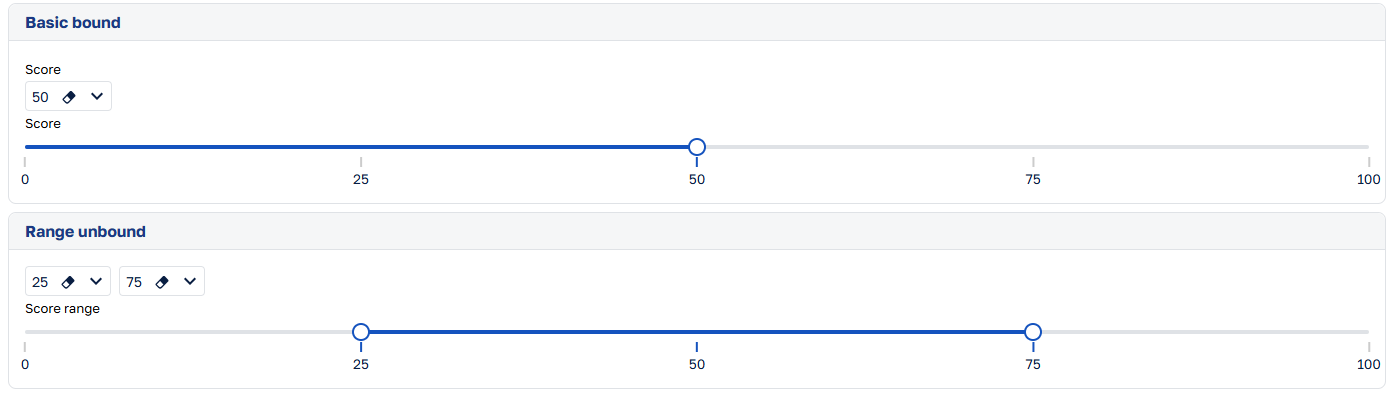
This version introduces a new discrete slider input for both XML templates and native UI views. It lets users select a single numeric value or a numeric range from an explicit list of allowed values, while keeping the selection snapped to the nearest allowed item.
In XML templates, use input-slider-discrete. In native UI views, use InputSliderDiscrete.
This component is a good fit when a field should only accept known numeric steps, for example a score scale, a percentage grid, or a bounded range selector.
Reference retrieving when setting lookup values programmatically
The TrySet...Async methods now execute the ReferenceRetrieving event rule with the TrySet trigger when resolving a lookup value. This lets lookup rules apply the same constraints to values set programmatically as to values selected in the UI.
See ReferenceRetrieving.
Deployment
Migration from Kernel Memory to Vector Data
The Kernel Memory project is now deprecated. RAG (Retrieval-Augmented Generation) is now implemented with Vector Data.
If you previously used Neos RAG features with PostgreSQL Database, you must update your vector tables to include the following new columns:
document_id(text, nullable): The unique identifier of the document.chunk_index(integer, not null, default 0): The index of the chunk within the document.chunk_count(integer, not null, default 0): The total number of chunks in the document.
For example, if your vector table is named km-documents, run the following SQL command to add the new columns:
ALTER TABLE "km-documents"
    ADD COLUMN document_id text NULL,
    ADD COLUMN chunk_index integer NOT NULL DEFAULT 0,
    ADD COLUMN chunk_count integer NOT NULL DEFAULT 0;
See SearchDocumentSkill for more details on using the new Vector Data APIs.
Removed SignalR POD
The SignalR POD is no longer deployed in production. Production namespaces now run without a dedicated SignalR POD.
Warning
A namespace deployed with Neos 3.2 is only supported by Neos 3.2, 3.1, or 3.0 clusters. For Neos 3.0 and 3.1 clusters, patch versions 3.0.20 and 3.1.8 or later are required.
See SignalR with a Redis backplane for more details on how SignalR is now implemented in production.
Database connection pool metrics
Neos backend servers and task runners now expose normalized Prometheus metrics for their database connection pools. neos_db_pool_connections reports the current active and idle connection counts, and neos_db_pool_max_connections reports the configured maximum when the provider can supply it.
Note
Keep in mind that "database connection limits (whether resource-bound or configured)" and "database CPU/RAM resource saturation" are two different topics:
- Database connection capacity is a resource in its own right. It is constrained by PostgreSQL's connection slots and underlying OS/network resources, independently of CPU and RAM saturation.
- Your active connection count may plateau when it reaches your configured connection limit.
- Your active connection count may also plateau because of database CPU/RAM saturation, without reaching your configured connection limit.
An example of connection saturation / load testing was added in TechnicalDemos (DatabaseWorkloadDiagnosticsUI) and uses procedures and sleep instructions, for instance:
BEGIN
    PERFORM pg_sleep(10);
END;
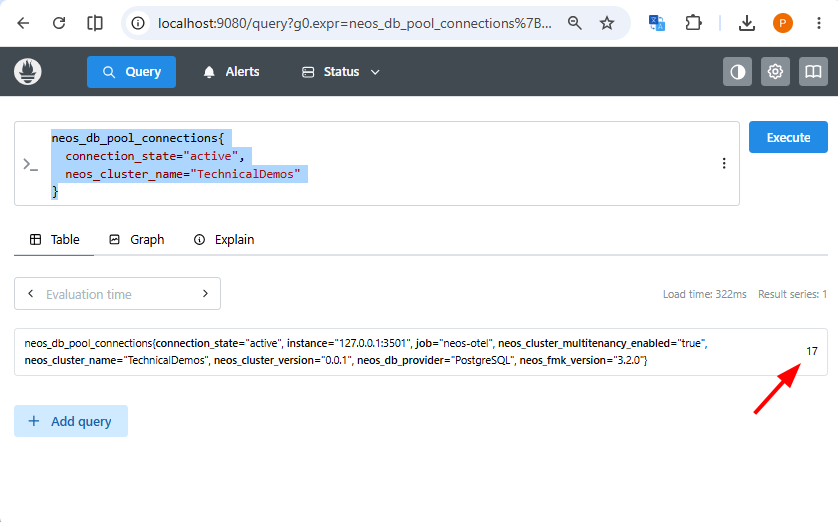
The metrics are aggregated per provider and process, never per pool. This keeps tenant database identifiers out of metric labels and avoids creating one Prometheus series per tenant. PostgreSQL through Npgsql reports individual pools internally, which Neos aggregates before export, including the combined maximum. SQL Server through SqlClient provides only process-wide active and idle counters, so it does not expose a maximum series.
An absent maximum series is not a zero. For providers that expose it, operators can calculate saturation from the active count divided by the maximum; for SQL Server, the unavailable maximum must not be interpreted as zero or unlimited. Background server methods run in the task runner, so their connections are reported by the task runner's own metrics endpoint.
See Database connection pools and Database pool versus process scope.
PostgreSQL localhost connection timeouts after the Npgsql upgrade
Npgsql, the data provider for PostgreSQL, has been updated.
Depending on local network settings, PostgreSQL connection strings that use localhost as the host may now time out when opening a connection. The specific network settings that trigger this behavior have not yet been identified.
If this occurs, use one of the following workarounds:
- Replace
localhostwith the IPv4 loopback address:127.0.0.1. - Replace
localhostwith the IPv6 loopback address:::1. - Add
GSS Encryption Mode=Disableto the PostgreSQL connection string.
Metadata
Dependency analysis from the command line
Neos Studio's dependency analysis now runs from the command line with the neos dependencies command group, making it easy to keep a cluster healthy as it grows. Unused metadata tends to accumulate silently over time; now you can catch it automatically, before it ships.
Used in a pipeline, neos dependencies unused --fail-on-found fails the build whenever an unused element exists — so dead metadata is caught automatically instead of accumulating unnoticed.
neos dependencies unused --fail-on-found
Every command emits stable, deterministic YAML, so the same analysis is just as usable by your AI coding agents: they can see exactly what uses an element before renaming or deleting it, avoiding broken references.
See the full command group in the CLI reference.
Module accessibility
A metadata element can now declare Accessibility: Public (default) or Internal, and a module can grant targeted access to its Internal elements with InternalAccessGrantedTo. Marking an element Internal guarantees it's unused outside its module, so it can be reworked freely without risking a breaking change for consumers.
This is checked automatically almost everywhere a module boundary can be crossed:
- Metadata (YAML) —
check-metadataand Neos Studio's save pipeline (errorN108). - C# code — new Roslyn analyzers
NEOS0001-NEOS0003. Transpiled UI code is checked live in the Neos Studio editor and duringneos generate; handwritten server code gets the same three diagnostics through Visual Studio's live analysis or Sonar in CI. - UI templates and free-text
.NET typeproperties —neos generatemessages: a warning for.NET typereferences (M0090/M0091) and for a UI template referencing a module it doesn't depend on, but a hard, unsuppressible error for a UI template referencing anInternalelement without a grant.
See Module accessibility for details.
Neos Roslyn analyzers
A new GroupeIsa.Neos.CodeAnalysis.Analyzers package ships five diagnostics that catch classes of bugs the compiler alone can't see:
NEOS0001,NEOS0002,NEOS0003— a module boundary is crossed without the right dependency, layer, orInternalaccess grant (see Module accessibility above).NEOS0004— the result of a[MustUseReturnValue]-marked method (such asIUnitOfWork.SaveAsync) is discarded.NEOS0005— a resource is reached through the cluster's default namespace shortcut instead of its owning module's own namespace.
See Analyzers for all five diagnostics and how to resolve them, and Cluster and pipeline hardening for the cluster and pipeline settings that make the most of them.
Tenant Management
Filtering tenants by their users
The tenants list in Tenant Management could already answer "who has access to this tenant" through the authorized users tab. Starting from Neos v3.2.3, it can now answer the reverse question, "which tenants does this person reach", without leaving the list.
Three criteria are available in the filter bar: User login, pinned as a chip, plus User first name and User last name under More filters.
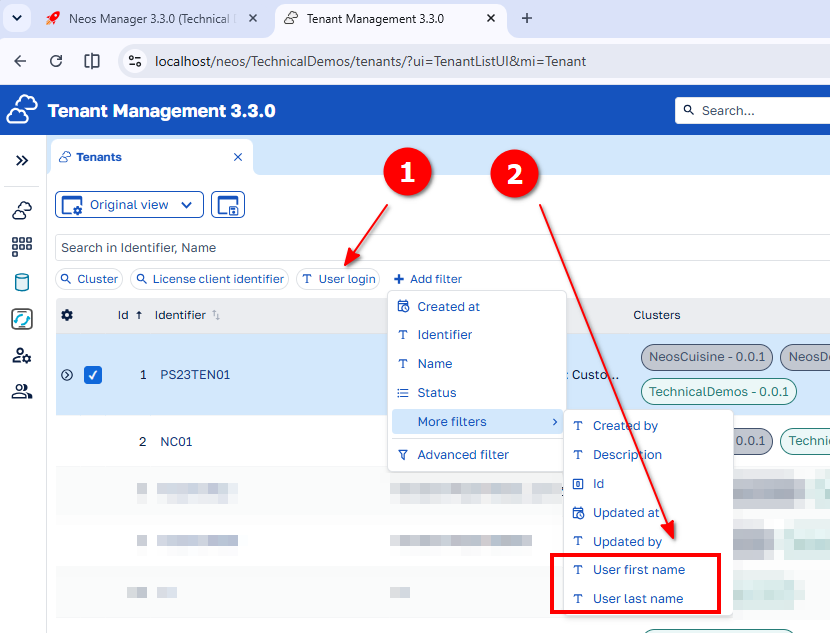
Each criterion keeps the standard operator palette, and every operator is evaluated per user: a tenant matches as soon as one of its users satisfies the criterion. "Starts with" on a login can therefore bring in tenants through several different accounts, and "in list" covers several logins in a single chip.
Belonging is the only test. A tenant appears when the user is attached to it, whether or not that account is active or expired, so the result reads as an audit of who has been granted access rather than of who can sign in today.
The criteria are filter-only and add nothing to reading the list: the collection they traverse is declared with ExposedInGet: false and LoadedOnGet: false, so it is never fetched with the tenants themselves, and an active criterion contributes one correlated sub-query.
See Filtering or quick search on nested properties to apply the same pattern to your own lists.
Connection string editor
Tenant Management now offers a structured editor for database server connection strings. The editor separates the most commonly configured settings into Main, Pooling, and Security tabs, while retaining the complete provider connection string on the Advanced tab.
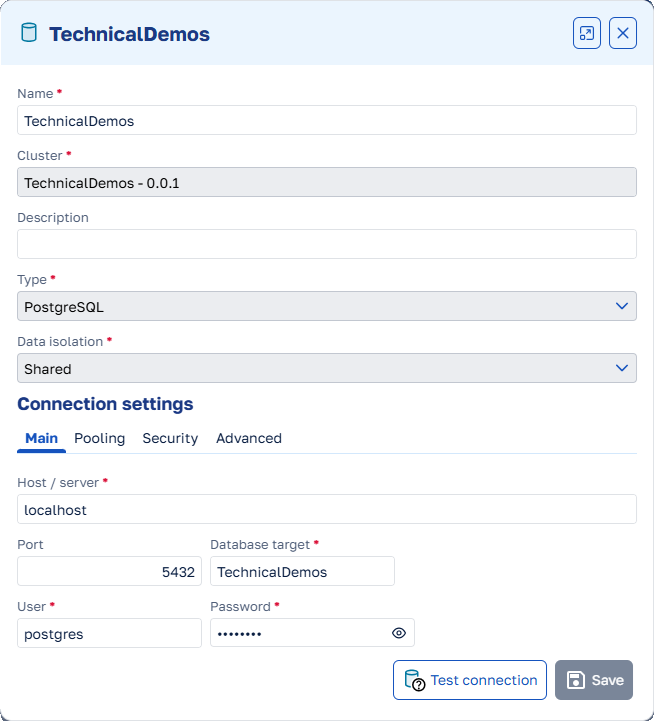
PostgreSQL connection strings can be edited structurally when the provider can parse them. SQL Server supports SQL authentication connection strings, and Oracle supports EZConnect data sources. Provider-specific formats that cannot be represented by the editor, such as SQL Server integrated security, Oracle TNS descriptors, or a non-structural server value, remain editable through the raw connection string.
When an existing connection string is valid but incompatible with the structured editor, Tenant Management explains why and keeps Advanced selected. Invalid connection strings are handled the same way with an error callout until they are corrected. The raw field is always available, including when a best-effort structured preview cannot be converted into a valid connection string.
See Database server connection strings.
Reporting
Cluster-level default report styles
Starting from Neos v3.2.2, a cluster can now provide a default ReportStyle for reports that do not name one themselves:
Reporting:
  DefaultReportStyleName: MyClusterReportStyle
Neos resolves the default when a report is opened in the designer and when Viewer or PDF output is generated. A report's own ReportStyleName takes precedence, and WithStylesCollection in business code can override both for one execution.
The report designer imports the selected bundle without applying it to the design canvas. Preview shows the applied result. Neos also keeps the shared styles out of the saved .mrt, so the .sts bundle remains the source of truth.
See Report styles for configuration, precedence, and designer behavior.
Upgrade troubleshooting
After upgrading and regenerating a cluster, review the following generation and compilation errors:
- Entity view route placeholders: a placeholder in an exposed route must match an entity view key property,
{rootRoute},{fileName}, or{$keys}. Replace an invalid placeholder, or remove the custom route to use the generated default route. See Entity view routes. - Undefined properties and images in UI templates: correct references to undeclared UI view properties, or define the required property. Declare every image used by a template in the cluster image list. See UI template completions and diagnostics for current item access.
string.Concatin entity view property expressions: replacestring.Concat(a, b)witha + b. With C# 14, the preferredstring.Concatoverload usesReadOnlySpanand cannot be used in an expression tree. The+operator is also translated to SQL by EF Core, whereasstring.Concatis evaluated in memory.- Report IDs in UI view code: replace the fully qualified
GroupeIsa.Neos.Designer.UIAbstractions.Ids.ReportIdtype withReportId, because the type has moved and is now available without its former namespace.
What's new for DevOps
If you operate a deployed Neos environment, several changes in this release affect infrastructure and hosting, runtime configuration, operations and monitoring, or migration and upgrade steps.
See What's new for DevOps in 3.2 for a digest curated for ops/infra teams.
What's new in documentation
This release includes significant documentation improvements.
Reorganized content
The documentation navigation has been reworked around a smaller number of clear entry sections so it better matches the main user workflows.
The top navigation now points to four task-oriented sections:
- Getting started for installation, prerequisites, and first implementation steps,
- Build for data modeling, backend, frontend, templates, and tests,
- Operate and deploy for deployment, observability, reporting, and operational topics,
- Platform and tooling for reusable framework assets, supporting clusters, AI features, and development tools.
The result is a documentation structure that is easier to scan, more predictable to browse, and better suited to the table-of-contents filter when users need to narrow the visible navigation quickly.
Updated documentation
- Documentation home — The documentation landing page has been redesigned and aligned with the new section-based navigation.
- Migration customization — Added a decision guide with a comparison table and Mermaid flowchart.
- Tenant resolved interceptor — Clarified how to preserve the previous resolved result and when to use
WithContextValueorWithClientOnlyContextValue.