License
REMARK
License is both a noun and a verb in the United States.
If you live in any other English-speaking country, you will spell it licence when you use it as a noun and license when you use it as a verb.
WARNING
Sometimes, the word "licence" (UK or FR spelling) may be used instead of "license" (US spelling).
In particular, note that the environment variable is called Reporting:StimulsoftLicenceKey, not Reporting:StimulsoftLicenseKey.
Also, the Helm environment secret is called neos-report-licence, not neos-report-license (see documentation).
Getting a license key
Creating reports in Neos requires a Stimulsoft account with a license.
Connect to your Stimulsoft account and open the Activation menu.
Copy the C# block of code in the Activation Using Code section and paste it in a text editor.
Delete Stimulsoft.Base.StiLicense.Key = " at the start, "; at the end, " + and line breaks on each line.
You should end up with one long line that is your license key.
Configuring the license key for Neos
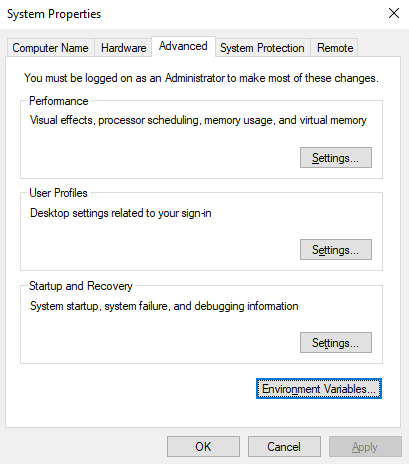
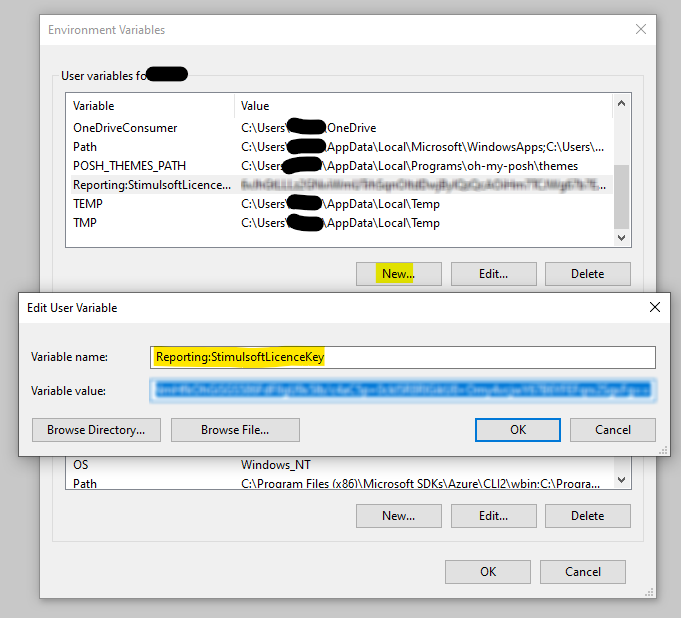
Create a new environment variable in the system properties.
- Variable name :
Reporting:StimulsoftLicenceKey(NOTE: spelled "Licence", not "License") - Variable value :
Paste your license key here
 \
\
 \
\
Warning
You need to close and reopen your powershell or cmd consoles and restart your application for the environment variable to take effect.