Dynamic Additional Properties
Purpose
The goal of this feature is to allow authorized users to customize an entity by dynamically adding additional data. Instead of requiring static schema changes, this system provides a flexible way to enrich entities with metadata-driven properties.
All reusable code and UI components supporting this feature are implemented in the Tenants module.
1. Metadata Model
The system relies on two main types of metadata definitions:
1.1. Extended Entity (ExtendedEntity)
Defines which entity can be extended with additional properties.
| Field | Description |
|---|---|
| EntityName | Name of the extended entity (primary key) |
| Description | Description of the entity |
1.2. Additional Property Metadata (AdditionalPropertyMetadata)
Describes the configuration of a custom property.
| Field | Description |
|---|---|
| EntityName | Name of the extended entity (primary key, part 1) |
| Name | Name of the property (primary key, part 2) |
| Caption | Display label for the property (localized) |
| DataType | Data type of the property |
| EnumTypeName | Name of the enumeration type (if DataType = Enumeration) |
| DefaultValue | Default value |
| Required | Whether the property is mandatory |
| MaxLength | Maximum length (if DataType = String or DataType = Localizable String) |
| AllowMultipleValues | Whether multiple values are allowed (array of strings) |
| Position | Display order of the property |
1.2.1 Additional Property data type (AdditionalPropertyDataType)
| Value | Description |
|---|---|
| Boolean | Boolean value |
| Color | Color code value |
| Date | Date value |
| DateTime | Date/time value |
| Invariant DateTime | Date/time value not converted to UTC |
| Decimal | Decimal |
| Enumeration | Enumeration value |
| Unique Identifier | GUID value |
| Integer | Integer value |
| Localizable String | String value that is designed to be translated into multiple languages depending on the user’s locale |
| Long Integer | Long integer value |
| String | String value |
1.2.2. Additional Property default value
The default values that can be assigned depend on the property type. They must be chosen so that they can be properly understood and interpreted across all application layers (database, domain, application, client).
| Type | Valid Example(s) | Description |
|---|---|---|
| Boolean | true, false |
Simple logical values |
| Guid | =Guid.NewGuid() |
Generates a unique identifier |
| Date | =DateTime.Today |
Current date (time set to midnight) |
| DateTime | =DateTime.UtcNow=DateTime.Now=DateTime.Today |
UTC, local time, or just today’s date |
| Enum | MemberName |
Name of any defined member of the enumeration |
| Integer | 42, -7, 0 |
Any valid integer (System.Int32) |
| Long | 1234567890 |
Any valid integer (System.Int64) |
| Decimal | 3.14, -0.5, 1000.00 |
Use .NET invariant culture (decimal separator .) |
| String | Hello World |
Do not surround with quotation marks |
1.2.3. Example: Property Metadata Definition
EntityName: "Tenant"
Name: "AuthorizedTenants"
Caption:
  en: "Authorized tenants"
  fr: "Tenants autorisés"
DataType: "String"
MaxLength: 100
Required: true
AllowMultipleValues: true
Position: 1
This definition creates a custom property named AuthorizedTenants for the Tenant entity, with the following rules:
- Localized caption in English and French
- String values with a maximum length of 100 characters
- Required field
- Supports multiple values
- Displayed at position 1 in the UI
2. Metadata Management UI view (AdditionalPropertyMetadataUI)
A dedicated management UI view is provided to create, update, and delete property metadata.
Key features:
- Define additional properties for any extended entity
- Duplicate existing metadata definitions for faster configuration
- Control validation rules and display order
3. Storing Additional Property Values
The actual values entered by users are stored in the AdditionalProperty entity.
| Field | Description |
|---|---|
| EntityName | Name of the extended entity (primary key, part 1) |
| EntityId | Identifier of the specific entity instance (primary key, part 2) |
| PropertyName | Name of the additional property (primary key, part 3) |
| Value | Value of the property (JSON serialization of the data) |
3.1. Example: Additional Property Value
EntityName: "Tenant"
EntityId: 1
PropertyName: "AuthorizedTenants"
Value: ["101", "102", "103"]
This example shows that the Tenant entity with ID 1 has an additional property AuthorizedTenants containing a list of three tenant IDs: 101, 102, and 103.
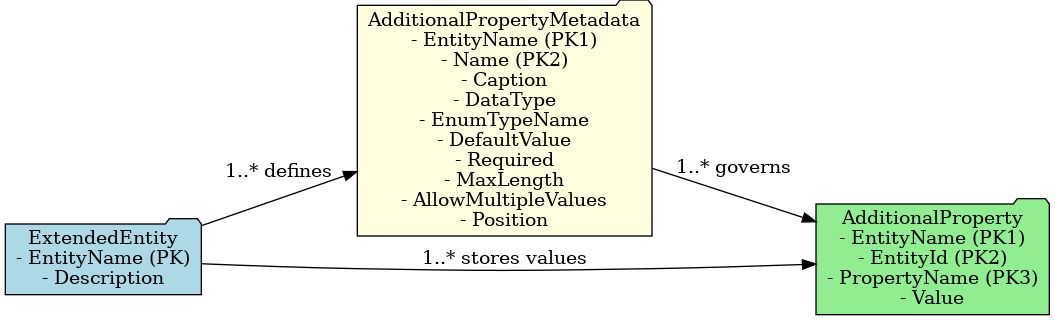
4. Diagram
The following diagram illustrates the relationship between Extended Entities, Property Metadata, and Property Values.
5. Summary
By combining metadata definitions with dynamic storage, dynamic Additional Properties enable:
- Flexible entity customization without schema changes
- User-friendly configuration through a management screen
- Consistent validation and display rules defined once and reused everywhere
This approach empowers administrators to adapt entities to evolving business needs quickly and safely.
6. UI Components
6.1. Additional Properties Editor (additional-properties-editor)
This component generates an input form dynamically based on the metadata.
The form adapts its input fields depending on the property’s data type and whether multiple values are allowed.
Parameters:
| Parameter | Description |
|---|---|
| can-save | Indicates if the component can save property values (one-way) |
| data | Represents the additional property values (two-way) |
| entity-id | The identifier of the entity instance (one-way) |
| entity-name | The entity name (one-way) |
| has-changed | Indicates if at least one property value has changed (two-way) |
| metadata | The property metadata (two-way) |
| read-only | Whether the component is read-only (one-way) |
Example Template:
<group-box-content>
  <additional-properties-editor
    entity-name="Tenant"
    entity-id="@DatasourceCurrent.TenantId"
    metadata="@Fields.AdditionalPropertyMetadata"
    data="@Fields.AdditionalPropertyData"
    has-changed="@Computeds.AdditionalPropertyHasChanged"
    can-save="false"
  />
</group-box-content>
REST API Integration:
- Supports
GET,POST, andPUTcalls for property values
6.2. Multi-Value Editor (input-multi-value)
This component allows entering multiple values for a property.
It is used internally by the additional-properties-editor.
Parameters:
| Parameter | Description |
|---|---|
| has-changed | Tracks changes to property values (two-way) |
| label | The field label (one-way) |
| max-length | The maximum data length (one-way) |
| read-only | Read-only mode (one-way) |
| required | Whether the field is mandatory (one-way) |
| values | Array of property values (two-way) |
Example Template:
<if condition="$Item.AllowMultipleValues">
  <input-multi-value
    values="$Item.Value"
    label="$Item.Caption"
    required="$Item.Required"
    read-only="$Item.ReadOnly"
    max-length="$Item.MaxLength"
    has-changed="@Fields.HasChanged"
  />
</if>
7. Example Implementation
A complete example can be found in the TenantManagement application, where additional properties are implemented for the Tenant entity:
- Metadata Management:
AdditionalPropertyMetadataUI - Display of Property Values:
TenantListUI - Property Creation:
TenantCreationUI - Property Editing:
TenantEditionUI