Tenant Management
The management of the tenants is accessible with the URL prefix /tenants.
Example for the cluster Northwind.
https://localhost/neos/Northwind/tenants
You can also use the Tenant Management button in the manager page.
Clusters
It is necessary to list all the clusters that will be accessible for the tenants.
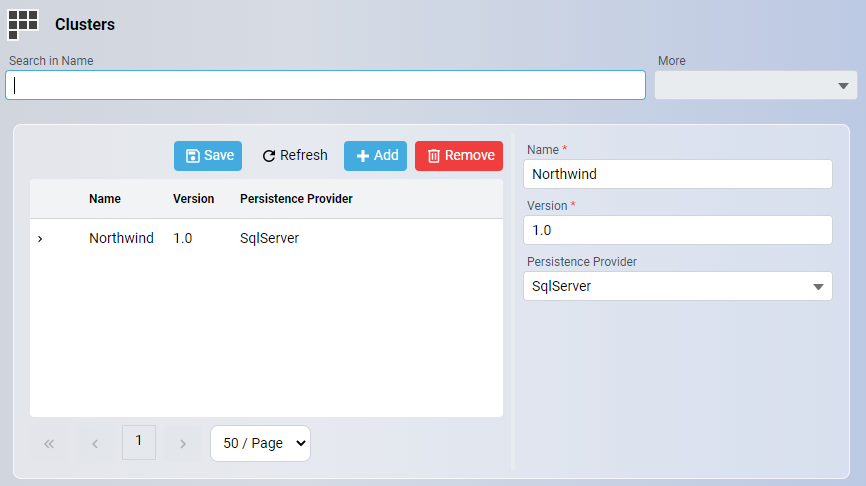
| Property | Description |
|---|---|
| Name | The name of the cluster. It must be identical to the ClusterName property found in the YAML configuration file of the cluster. |
| Version | The version of the cluster. |
| Persistence Provider | The target database of the cluster (SqlServer, PostgreSQL or Oracle). |
Deployment solutions
A deployment solution is a named list of versioned clusters, each with an optional shared database, used to create a tenant in one step. See Deployment solutions.
Database server
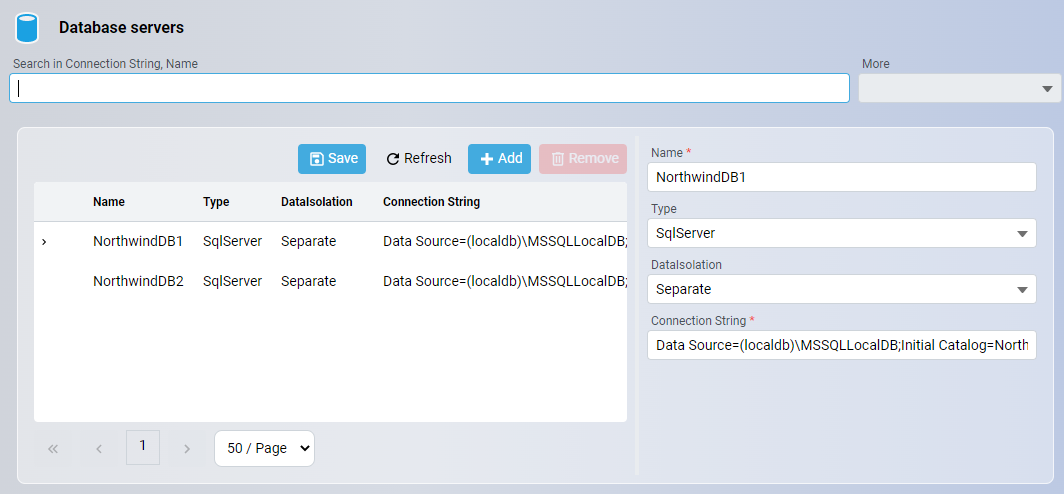
For the structured connection string editor, provider limitations, and fallback to the raw connection string, see Database server connection strings.
| Property | Description |
|---|---|
| Name | The unique name of the database server. |
| Type | The database (SqlServer, PostgreSQL or Oracle). |
| Data Isolation | Indicates whether the database is designed for separate or shared mode. |
| Connection String | Connection String of database. |
Tenants
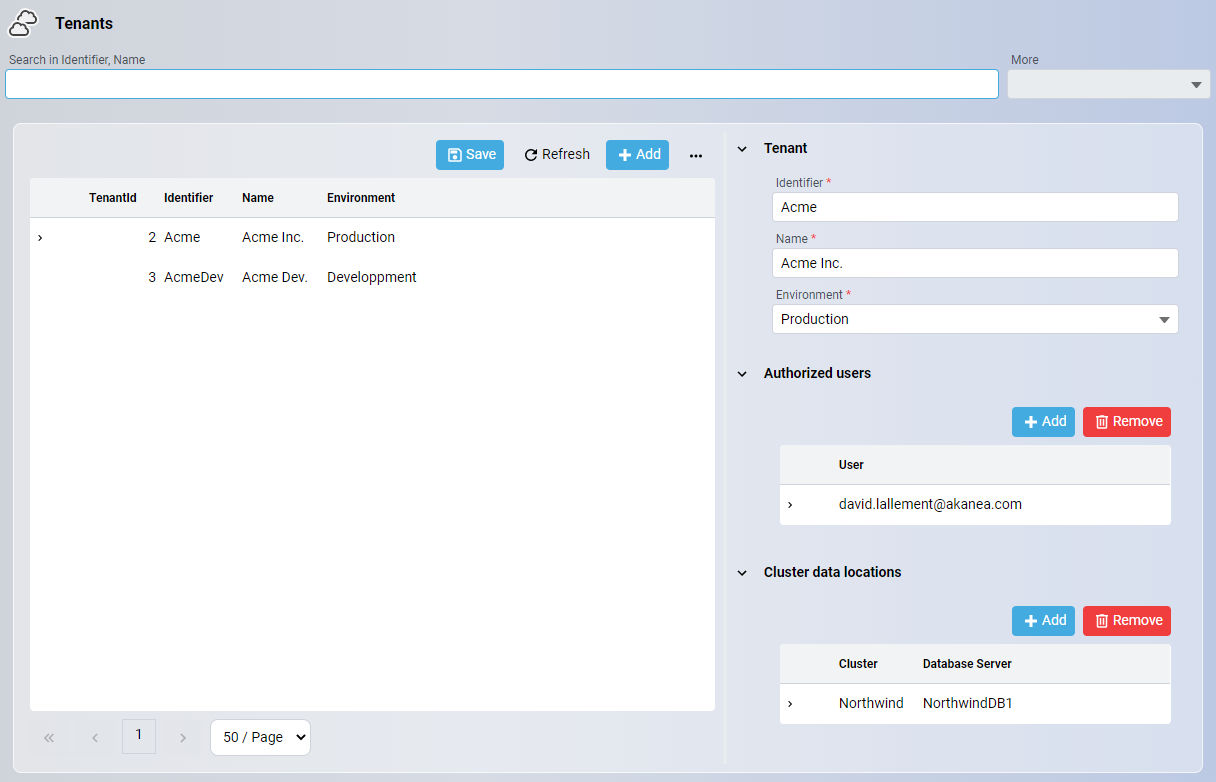
| Property | Description |
|---|---|
| Identifier | The identifier of the tenant (used in the HTTP request). |
| Name | Name of the identifier (used in selector screen). |
| Environment | Environment of the tenant (Production, Staging, Development). |
| Authorized users | List of authorized users for the tenant. |
| Cluster data locations | Data locations for each authorized cluster. |
Note
In development mode, changes to tenant settings are applied immediately after saving.
To add the same users to several tenants, use user groups.
Configure connection
From 1.18 version, when you run the command neos run -mt, the Tenant Management use a database instead of yaml persistence.
So, you need to configure the persistence of Tenant Management to specify :
- The database type
- The connection string
This configuration should be added on the cluster configuration (at the root directory) in yaml file.
Example of configuration file :
<mycluster>.tenant-management.yml
TenantManagement:
  DatabaseType: PostgreSql
  ConnectionString: Server=localhost;Port=5432;Database=TenantManagement;User Id=xxxx;Password=xxxx;
Import existing data
If you had an existing configuration in the tenantsData directory, at the first 'neos run -mt', the data will be imported in the database automatically.
Important
Please note that the database should be new, otherwise the import won't be done.
First use (no tenantsData folder) : default user account login
When you run the neos run -mt for the first time, then the Tenant Management need database configuration to create the database.
Also, the Tenant Management has permissions.
To have a first admin user, you should configure a default user account login.
This is the email account for the tenants administrator.
You can configure it in :
- An environnement variable
Tenants__DefaultUserAccountLogin. - Add
DefaultUserAccountLoginin yaml configuration. Example :
TenantManagement:
  DatabaseType: PostgreSql
  ConnectionString: Server=localhost;Port=5432;Database=TenantManagement;User Id=xxxx;Password=xxxx;
  DefaultUserAccountLogin: <your email>
Purging notifications
The Tenant Management cluster generates notifications that accumulate over time in its database. To maintain optimal database performance, it is recommended to periodically purge old notifications using the Task Scheduler. For detailed instructions on how to set up and configure a purge task for the Tenant Management cluster, see Purging notifications in Tenant Management cluster.